Hercules DJControl Inpulse 200: Starter Controller with Clear Limits
January 14, 2026
In this review of the Hercules DJControl Inpulse 200, we explore its beginner-friendly LED beatmatching guides and DJUCED software alongside its plastic build, audio dropouts, and software quirks to help novices decide if it’s the right starter controller.
Hercules DJControl Inpulse 200: Starter Controller with Clear Limits
If you’re just dipping your toes into DJing, the Hercules DJControl Inpulse 200 offers a straightforward way to get going. It pairs basic hardware with beginner-friendly software, but keep your expectations grounded—this isn’t a long-term setup, and it shows in build quality and software wrinkles.
Who should consider this controller?
The Inpulse 200 is designed for total novices or hobbyists wanting a simple, guided introduction to mixing. It’s perfect if you’ve never tried beatmatching or handling jog wheels live. The controller’s small size and light weight make it easy to tuck on your desk for practice sessions.
But don’t mistake it for a performance-ready device. If you need robust outputs, metal build, or a professional workflow, look elsewhere.
Features that stand out—and those that don’t
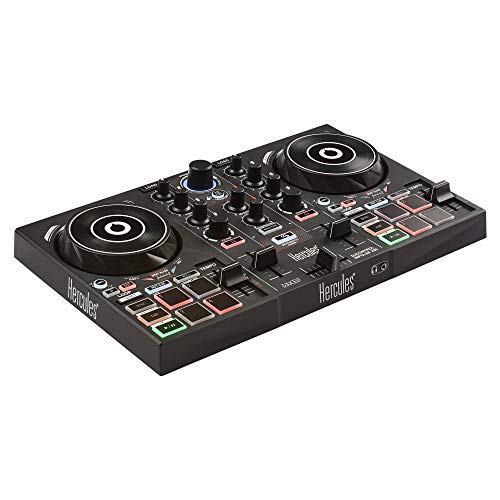
One of the main selling points is a set of LED guides integrated right around the pitch sliders and jog wheels. They visually assist you with tempo changes and beat alignment, helping you manually sync tracks instead of relying on autotune features. There’s also an “energy” indicator that colors the deck blue or red to hint at mood shifts in your music selection.
The included DJUCED software has built-in tutorials with videos explaining basics like loading tracks, setting cue points, and scratching. Fair warning: while the tutorials are there, they force you to exit and reenter the lesson each time you want to practice, which disrupts the flow. If you move beyond beginner basics, you’ll probably prefer external videos or a second screen for learning.
Pads on each deck let you trigger hot cues, rolls, FX, and samples, but be aware the pads can feel overly sensitive and the jog wheels register accidental touches when you’re moving fast. The jogs work fine for light scratching or beat nudges but wobble and misread inputs under pressure.
Build and durability
The chassis and controls are entirely plastic. This keeps the unit light—under two pounds—and portable, but also fragile. The plastic feels thin, pads click with little resistance, and the pitch sliders may get sticky after weeks of use. The controller isn’t designed to handle rough handling or heavy transport—you’ll need to treat it gently.
Audio and software reliability
This controller has a built-in sound card with both headphone cue and composite outputs. However, when passing audio through it, the signal can suffer from clicks, pops, and dropouts. Changing USB ports and cables may help, but the device still struggles with interference issues. That’s a significant downside if you plan to do live streams or party gigs.
The DJUCED software is functional for learning but has stability problems—dragging large music libraries into it can cause crashes, and BPM indicators adjust unexpectedly after loading tracks, which makes beatmatching tricky. Firmware updates are buried in a Windows-only control panel and don’t always update correctly.
If you swap in VirtualDJ or Serato Lite, you might get a smoother experience and more tweak options, but that comes at the cost of losing the helpful onboard light guides and may cause compatibility headaches on macOS or older hardware.
Limitations to keep in mind
Beyond beginner use, the controller reveals several flaws:
It lacks balanced outputs—only RCA and headphone jacks are available. The crossfader doesn’t offer curve adjustments, meaning transitions are either abrupt or wide open, with no fine-tuning. Jog wheels sometimes glitch at high speeds, forwarding the track unintentionally. And as mentioned, tutorials are inflexible, forcing constant context switching.
If you want instant effects, multi-colored pad feedback, or more durable metal parts, this controller won’t satisfy.
What to consider instead?
If you’re ready to invest in something more substantial, look for controllers that feature a solid metal build (like the Denon MC4000 or Pioneer DDJ-400), better audio interfaces, full-size jog wheels, and dedicated FX knobs and loop controls.
Software-wise, VirtualDJ and Rekordbox handle large music collections and complex setups much better.
For portability with improved reliability, controllers like the Numark Mixtrack Platinum FX offer better construction and cleaner outputs.
Bottom line: keep it simple or look up
The Hercules DJControl Inpulse 200 is a decent, budget-friendly launchpad for first-timers who want some guidance on manual beatmatching and basic mixing. The onboard lights and easy pad modes help demystify early hurdles.
That said, plastic wear, unreliable audio, and awkward software quickly become frustrating once you want to move beyond the basics. It’s a good basement or bedroom practice toy but not a rig you’d bring to serious gigs or streaming sessions.
If you’re serious about DJing and envision playing live or doing longer sets, skip this and save for an upgrade sooner. For absolute beginners on a shoestring budget, it’ll get you started—but you’ll outgrow it fast.